Factions Gameplay
Factions are the central social structure of the server. They hold territory, share resources, run wars and effectively operate as their own internal economies.
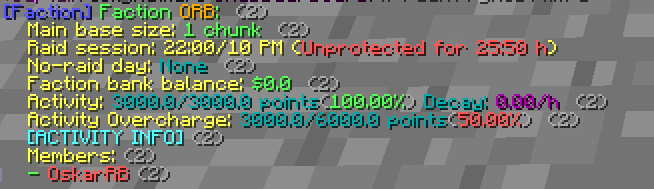 The image shows the Faction interface, with details provided below.
Joining or creating a faction
To join an existing faction, a member with sufficient rank has to invite you using /f invite <playername>. To start your own, use /f create <faction name>. After creation you'll need to place a faction flag. Without one you can't claim land or use most faction features.
Internal ranks
Factions have five internal ranks, numbered 1 to 5, with 5 being the faction leader. Officers can adjust members with /f promote <playername> and /f demote <playername>. Each rank unlocks a different set of permissions, ranging from chest access to claiming land and inviting new members. Higher ranks should be reserved for players you genuinely trust.
| Rank |
Deposit Money |
Modify Faction Terrain |
Invite New Members |
Withdraw Money |
Accept Ally Requests |
Send Ally Requests |
Unclaim Faction Chunks |
| Level 1 |
✔ |
✖ |
✖ |
✖ |
✖ |
✖ |
✖ |
| Level 2 |
✔ |
✔ |
✖ |
✖ |
✖ |
✖ |
✖ |
| Level 3 |
✔ |
✔ |
✔ |
✖ |
✔ |
✖ |
✔ |
| Level 4 |
✔ |
✔ |
✔ |
✔ |
✔ |
✔ |
✔ |
| Level 5 (Leader) |
✔ |
✔ |
✔ |
✔ |
✔ |
✔ |
✔ |
Claiming land
To expand your base, stand inside the chunk you'd like to claim and run /f claim. Each additional chunk costs more than the last, so larger bases get expensive quickly.
Unclaiming a chunk refunds 80% of its original purchase cost — at thirty chunks, that's $11,980,680 back in your bank.
Sign in to access the Claim Calculator and plan your expansion before you commit the cash.
Useful faction commands
/f create <name> — create a new faction./f invite <player> — invite a player to join./f claim / /f unclaim — claim or release the current chunk./f home — teleport to your faction flag./f outpost — teleport to your faction outpost./f info <faction> — inspect another faction's details./f promote / /f demote — adjust member ranks.
Activity Information
Cap
The Activity Cap is dynamic and scales based on the number of members and operational factories in your faction.
Passive Decay
Points are lost passively every hour. This decay applies only to factions with a CAP higher than 5,600; factions below this threshold are not affected by passive point loss.
Overdrive
Reach 100% Activity and continue performing actions to build up Overcharge.
- Effect: Once activated, all factories receive a ×3 production and storage boost for 24 hours.
- Cooldown: 24 hours after the boost ends.
Production Impact
Factory productivity is directly tied to your Activity level. If it falls below 70%, production speed decreases proportionally, down to a minimum of 10%. Keeping your activity level high is essential to maintaining a profitable operation.
Earning Activity
- Points are earned through any actions that grant RP, such as tasks, killing NPCs and other players, and similar activities.
- Selling items in the shop does not count.